 Omega HubOmega HubOmega Hub
YGO Omega troubleshooting: fix updater errors, black screens, freezes, launch crashes, Vulkan drivers, the decklist bug and Discord detection.
This YGO Omega troubleshooting guide covers the most common problems on Windows and Linux. Find your symptom below and jump to the fix. For a first install, or for Mac, Android and iOS, use the Install Guide.
| Symptom | Fix |
|---|---|
The updater downloads update.zip and stops | Make the folder writable |
| The updater won't run on Windows 7 or 8 | Move to a supported Windows |
| Black screen on Windows | Install codecs or reset |
| The game freezes on Windows | Change the compatibility settings |
| Stuck on the background picture | Unblock GitLab |
Segmentation fault on Linux | Check the drivers |
| 9999/9999 in the Deck Manager | Install the SQLite packages |
| Black screen on Linux | Reset the settings |
| The game can't find Discord | Replace snap or Flatpak Discord |
Install to a folder you can write to, or OmegaUpdater.exe fails. The game is portable, so you can move the folder later.
The Windows installer is the simplest route. It opens OmegaUpdater.exe, which downloads the game and its updates, then checks for missing .NET updates and firewall exceptions.
To install by hand instead:
Omega_Launcher-Windows.zip from the latest release.OmegaUpdater.exe and let it download the game.If update.zip stays in the folder, the updater couldn't extract it. Follow the first fix below.
The updater can download update.zip but has no permission to extract it over the game files, because the folder isn't writable.
OmegaUpdater.exe again.If it still fails, use the Windows installer.
Your system lacks the codecs that play video backgrounds. You have two options, and the first keeps animated backgrounds working.
"YGO Omega.exe" --reset
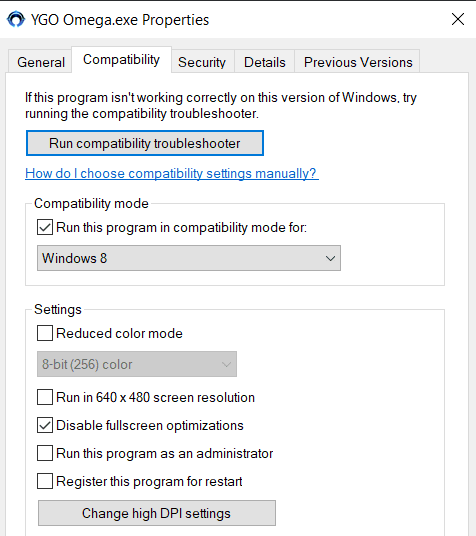
The freezes come from windowed mode, through a conflict between Windows and Unity. Until a fix ships, use this workaround:
YGO Omega.exe and choose Properties.If the game launches and downloads no bundles, something may be blocking gitlab.com. Open Player.log in this folder and look for an error resolving GitLab:
%userprofile%\AppData\LocalLow\Duelists Unite\YGO Omega
If you use a custom DNS server or something like Pi-hole, whitelist GitLab and check that gitlab.com opens in your browser. Then restart YGO Omega to start the download.
Every distribution needs an up-to-date Vulkan API and Kerberos 5, which most distributions ship preinstalled. Some also need the SQLite 3 development packages. Arch doesn't.
On Debian or Ubuntu:
sudo apt install libsqlite3-dev
On Fedora:
sudo dnf install sqlite-devel
ygomega.unzip first:sudo apt-get install unzip -y
unzip Omega_Launcher-Linux.zip
OmegaUpdater executable: right-click it, open Properties > Permissions and tick Allow executing file as program../OmegaUpdater
chmod -R 755 .
./YGO\ Omega
The game doesn't start, or the terminal ends with Segmentation fault:
$ ./YGO\ Omega.x86_64
MemoryManager: Using 'Dynamic Heap' Allocator.

Set current directory to /home/fox/Omega
Found path: /home/fox/Omega/YGO Omega.x86_64
Loading in SingleInstance mode
Segmentation fault (core dumped)
The usual cause is a Vulkan driver setup problem. On AMD, the system may also have loaded the radeon kernel driver instead of amdgpu.
Open a terminal with Ctrl+Alt+T and run:
lspci -nnk | grep -iA3 vga
00:01.0 VGA compatible controller [0300]: Advanced Micro Devices, Inc. [AMD/ATI] Mullins [Radeon R4/R5 Graphics] [1002:9851] (rev 45)
        Subsystem: Dell Mullins [Radeon R4/R5 Graphics] [1028:06bf]
        Kernel driver in use: radeon
        Kernel modules: radeon, amdgpu
If Kernel driver in use says radeon and Kernel modules also lists amdgpu, blacklist radeon and enable amdgpu. Skip this step if amdgpu isn't listed, because your GPU can't use that driver.
echo "blacklist radeon" | sudo tee --append /etc/modprobe.d/blacklist.conf
echo "options amdgpu si_support=1 cik_support=1" | sudo tee --append /etc/modprobe.d/amdgpu.conf
Then rebuild the initramfs for your distribution:
# Debian and Ubuntu
sudo update-initramfs -u

# Fedora
sudo dracut -v -f

# Arch
sudo mkinitcpio -P
Reboot and run the lspci command again to confirm that amdgpu loaded. If this doesn't apply to you, or the crash continues, set up Vulkan below.
# AMD
sudo apt install libvulkan1 mesa-vulkan-drivers vulkan-tools

# NVIDIA
sudo apt install vulkan-tools
AMD: Ubuntu's own repositories include the drivers.
sudo apt install libvulkan1 mesa-vulkan-drivers vulkan-tools
If Vulkan still fails, the oibaf PPA has newer Mesa builds. It's a development repository, so use it only as a last resort.
sudo add-apt-repository ppa:oibaf/graphics-drivers
sudo apt update
sudo apt upgrade
NVIDIA: the drivers include Vulkan, so add the repository and install them.
sudo add-apt-repository ppa:graphics-drivers/ppa
sudo apt update
sudo ubuntu-drivers autoinstall
sudo apt install vulkan-tools
AMD: Fedora ships the drivers, so this command fills any gaps.
sudo dnf install vulkan-loader mesa-vulkan-drivers vulkan-tools
NVIDIA: add the RPM Fusion repositories, which update themselves, then install the drivers.
sudo dnf install https://mirrors.rpmfusion.org/free/fedora/rpmfusion-free-release-$(rpm -E %fedora).noarch.rpm https://mirrors.rpmfusion.org/nonfree/fedora/rpmfusion-nonfree-release-$(rpm -E %fedora).noarch.rpm
sudo dnf install xorg-x11-drv-nvidia akmod-nvidia vulkan-loader vulkan-tools
The lib32 packages need the multilib repository enabled in /etc/pacman.conf.
# AMD
sudo pacman -S vulkan-radeon lib32-vulkan-radeon vulkan-tools

# NVIDIA
sudo pacman -S nvidia lib32-nvidia-utils vulkan-tools
Run the same command on any distribution:
vulkaninfo | less
==========
VULKANINFO
==========

Vulkan Instance Version: 1.2.131


Instance Extensions: count = 18
====================
        VK_EXT_acquire_xlib_display            : extension revision 1
        VK_EXT_debug_report                    : extension revision 8
        VK_EXT_debug_utils                     : extension revision 1
        VK_KHR_surface                         : extension revision 25
If you see information like this, Vulkan works.
The Deck Manager should list your own decks. If it fills with empty slots and shows 9999/9999 at the bottom, your system lacks the SQLite 3 development packages. Install them as in the Linux requirements, then reboot.
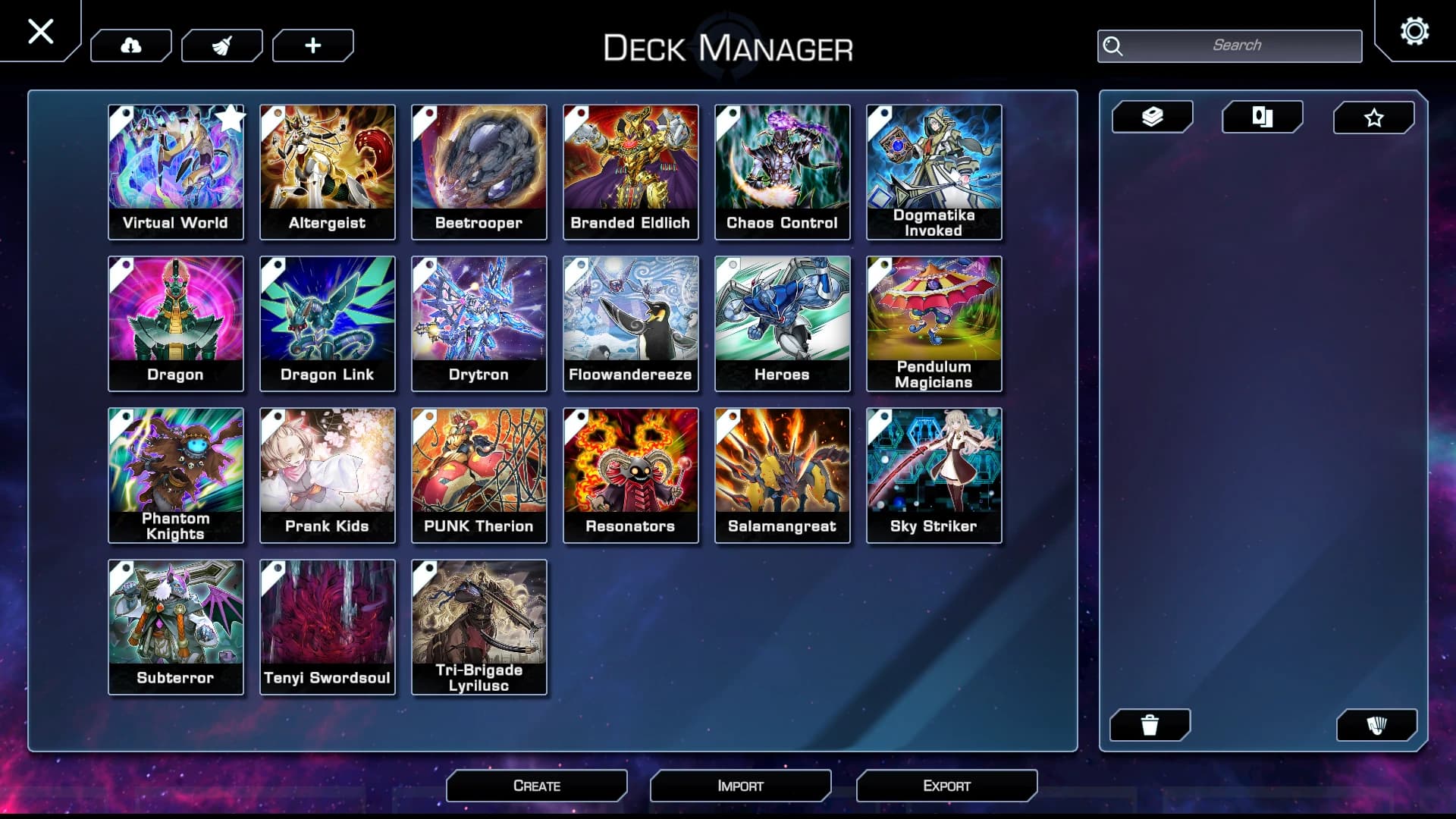
If you never reach the opening menu, the game is trying to play an animated background your system doesn't support, a flaw in Unity on Linux. Run the game from a terminal with --reset to return to the default settings:
./YGO\ Omega --reset
YGO Omega doesn't detect Discord installed from a snap or Flatpak package. Remove the snap or Flatpak version, then install a regular version for your distribution. Once you log in to Discord, open the game and go online.
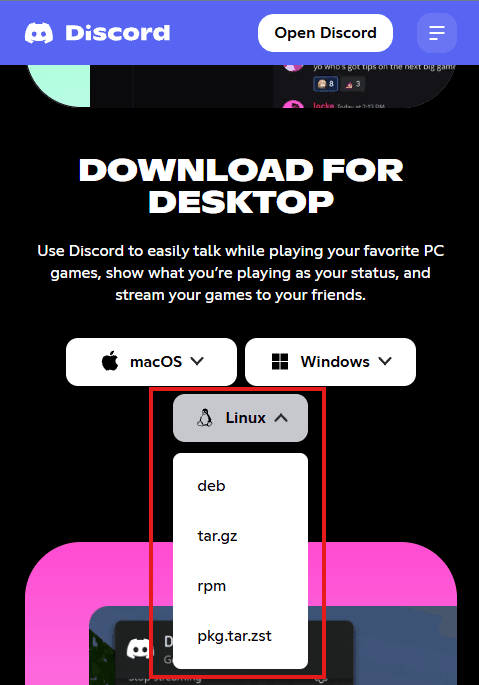
Open Discord's download page, open the Linux menu and pick deb.
To use the terminal instead, download the same file with wget:
wget -O discord.deb "https://discord.com/api/download?platform=linux&format=deb"
Either way, install the package from a terminal. Replace the path with the one to your discord.deb:
sudo dpkg -i /path/to/discord.deb
Discord comes from RPM Fusion, the same repositories as the NVIDIA drivers:
sudo dnf install https://mirrors.rpmfusion.org/free/fedora/rpmfusion-free-release-$(rpm -E %fedora).noarch.rpm https://mirrors.rpmfusion.org/nonfree/fedora/rpmfusion-nonfree-release-$(rpm -E %fedora).noarch.rpm
sudo dnf install discord
sudo pacman -S discord
To install the tarball by hand instead, download it with curl, extract it and move it into place:
curl -L "https://discord.com/api/download?platform=linux&format=tar.gz" --output discord.tar.gz
tar -xzvf discord.tar.gz
sudo mv Discord /opt/discord
sudo ln -s /opt/discord/Discord /usr/local/bin/discord
List your snaps, then remove Discord:
snap list
sudo snap remove discord
flatpak uninstall com.discordapp.Discord
Match your symptom to the fix. On Windows, check that the game folder is writable and that you run Windows 10 or later. On Linux, check Vulkan, the SQLite packages and your Discord install. The symptom table at the top of this guide links each fix.
Yes. Windows warns you because the team doesn't code sign the installer. Download it from the download page.
No. The updater needs .NET updates that Windows 7 no longer receives, so upgrade to Windows 10 or later.
The updater can't write to the game folder. Move the folder to the desktop or untick Read-only in its properties, then run the updater again.
Ask in the Omega-help channel on the Duelists Unite Discord. If a card behaves wrong, follow Bug Reports. For rulings, VIP and game modes, read the YGO Omega FAQ.
This page updates the Installation and Troubleshooting Guide by AntiMetaman on the Duelists Unite forum.
The game can't play its video background. On Windows, install the K-Lite Codec Pack or run the game with --reset. On Linux, run ./YGO\ Omega --reset.
Windowed mode conflicts with Windows. Run the game in Windows 8 compatibility mode and disable fullscreen optimizations.
The Vulkan drivers aren't set up, or an AMD system loaded the radeon driver instead of amdgpu. Follow the crash fix.
Your Linux system lacks the SQLite 3 development packages. Install them and reboot.
It doesn't detect snap or Flatpak Discord. Remove that version and install the one from Discord's site.
On Windows, Player.log is in %userprofile%\AppData\LocalLow\Duelists Unite\YGO Omega.
Comments
Sign in to comment with your Omega account.
No comments yet.